
Creating a Loyalty Scheme
To set up a Loyalty Scheme, login to the NOQ Backend Portal and then go to Marketing > Loyalty from the left navigation panel.
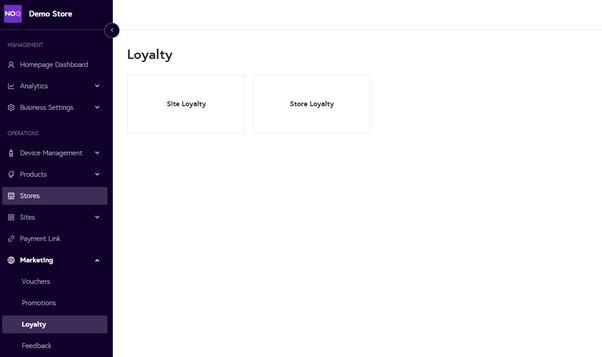
You can create either a Site-wide or Store-level Loyalty scheme. This guide focuses on Store Loyalty.
Step 1: Create a Store Loyalty Scheme
- Select Store Loyalty and click + Create Loyalty Scheme.

- Fill in the form:

- Name – Enter a name for the scheme.
- 1 point is awarded if customer spends – Choose a value between £1-£100.
- 1 point is redeemable for a value of (£) – Set how much each point is worth.
- Points awarded after – Choose when points become available to redeem:
- Instant
- 15 Days
- 30 Days
- Click Save when done.
Your scheme will now appear in the Store Loyalty section.
Step 2: Assign Stores
- Click the Pencil Icon under Assigned Stores and add your store(s).

- If you created a Site-wide Loyalty Scheme, use Assigned Sites instead.
Tracking Customer Points
To view customer points, go to: Analytics > Users > Customers

Redeeming or Collecting Points
- Take the customer’s order and click View Cart.
- Press the Loyalty button (if not visible, scroll left on the buttons).
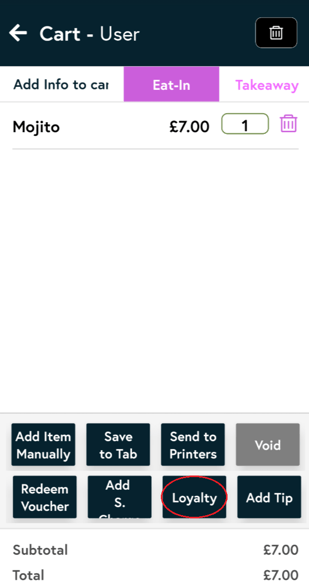
- The terminal camera will activate – ask the customer to present their QR code. Press Confirm once scanned.

- Once scanned, their name, accrued points, and redeemable value will appear.
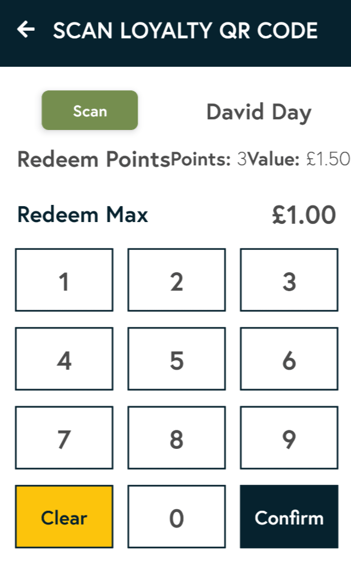
- Enter a discount value if they wish to redeem points, then press Confirm and checkout as normal.

Customer Registration Requirement
Customers must register on the PWA to participate.
- Their unique QR code can be found under Account > Loyalty in the PWA. The first QR Code is used to redeem points

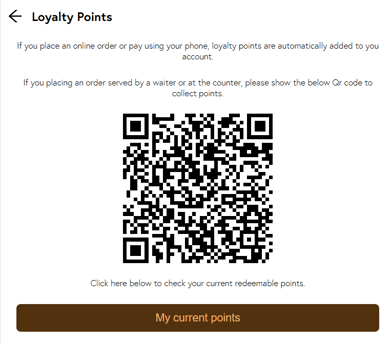
- Clicking on My Current points will show how many points they have collected and a redeemable QR code.

- Clicking on the Loyalty Scheme will show the customers a clearer view of the QR code and their Points Value.

To learn how to create loyalty scheme for your site please click here.