1. Login to NOQ Portal
2. From the left Navigation Panel select Marketing -> Promotions

3. Click on 'Create Promotions' on the top right corner.

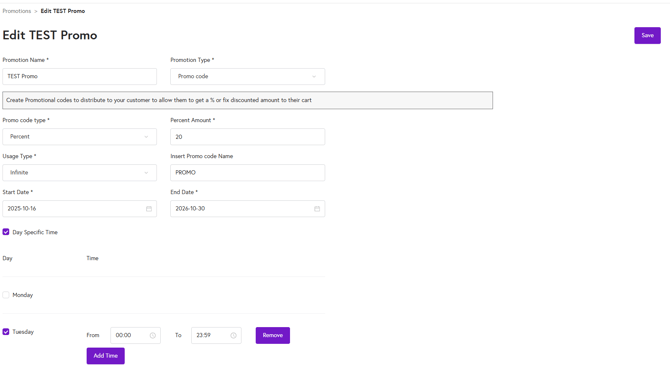
4. Set the Promo Code details:
- Add a Promotion Name.
- Select 'Promo Code' from the Promotion Type Dropdown.
- Under Promo Code Type, you can choose either Flat or Percentage (%), then set the applicable amount or percentage.
- Under Usage Type, you have three options: Single, Multiple, or Infinite
- Infinite: Enter the promo code name.
- Multiple: Enter the promo code name and set the maximum usage count to limit how many times it can be used.
- Single: Click on ‘Generate Promo Codes.
- Single Promo Code: Enter the promo code name, then click ‘Generate’.
- Multiple Single Promo Codes: Enter the promo code name and the number of promo codes you want to create, then click ‘Generate’.
- Enter Start and End Date.
- You can also select 'Day Specific Time' to add specific days and times you would want the promo code to be active.
- Click Save on the top right corner of the page to create the Promo Code.