
How to Issue Refunds for Past Orders on the Backend Portal
- Login to the NOQ Portal.
- Navigate to Transactions -> Payments.

- Select the filters from the top row as shown in the screenshot below. For each filter (Time Frame, Source, Sites, Zones, Stores and Status), choose your preferred options and click Apply. Alternatively, you can click the filter icon on the right to select all filters at once, then adjust and apply them based on your requirements.
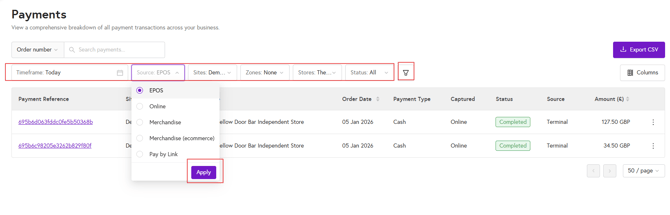
- Once you have found the order you need to refund, click the three dots on the right-hand side of that order row, then select Refund payment.

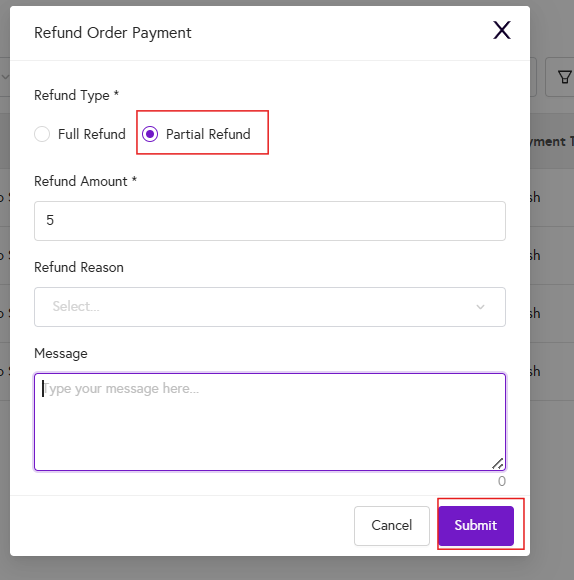
- A dialog box will then appear, where you can choose to issue a full or partial refund, add a message if needed, and click Submit.

- The customer will also receive an email notification, similar to the example below, confirming that the refund has been processed via the backend portal.

What if a Customer says they have been overcharged?
If a customer reports that they were overcharged for a card payment, follow the same steps: apply the relevant date filter, locate the transaction, and review the amount they were overcharged. Then click the three dots, select Partial refund (as shown in the screenshot below), enter the partial refund amount and a message, and click Submit.
Note: Once a refund is processed in the backend portal, it typically takes 3–5 business days for the funds to be returned to the customer’s account.
If the refund has not reached the customer or failed after 3–5 business days, first check the backend portal again to confirm that the refund shows as “Refunded” in the Status column by following the steps above. If it still does not appear as refunded, please raise a ticket with our support team here.
Can I refund an order paid with split payments?
Yes, you can issue a full refund for an order paid with split payments. The customer will receive the full refunded amount, and the corresponding split revenue will be deducted from each client’s account and returned to the customer.