
Before you start
Have these ready:
- Your ABN (and ACN if you're a company)
- Your driver licence or ID
- The BSB and account number of a bank account in your name or your business's name (where your payout will go)
- A bank statement from the last 12 months (only needed if you don't verify your bank instantly)
Step 1: Log in to the NOQ Portal
- Visit app.noqgroup.com.
- Enter your email address and click Continue, then enter the one-time passcode (OTP) sent to your email.
- Click your business name to continue.
Step 2: Create your merchant account
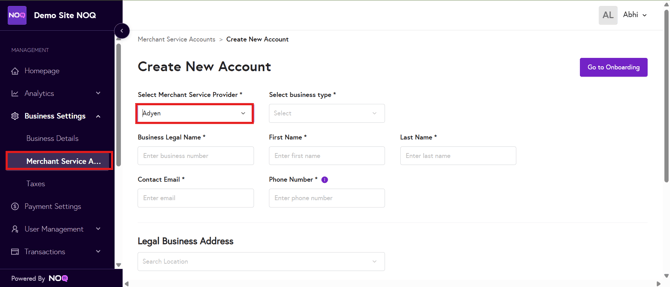
- Go to Business Settings > Merchant Service Accounts.
- Click Create Account.
- Select Adyen as your merchant service provider.
- Select your business type.
- Fill in your details. When adding your address, use the search bar and the other fields will fill in automatically.
- Click Go to Onboarding.
⚠️When entering your mobile number, do not include a leading 0 (zero) or +61.⚠️
Step 3: Complete your details
You'll see a Set up your account checklist. Start by making sure your business setup is correct:
- Next to Your business setup, click the pencil icon to edit it.

- Select the option that best describes your business: Sole proprietorship, Company, or Trust, partnership, or association, then click Next.

- Back on the checklist, click into each item and complete it. You can click Save and go to overview at any time and come back later.
Step 4: Add your bank account
- Click Bank account details.
- Choose how to verify your account:
- Verify via mobile banking app or website: select your bank and log in as normal.
- Upload a bank statement: enter your BSB and account number, then upload a statement from the last 12 months showing your name, account number and bank logo. One page, JPG, PNG or PDF, max 4 MB.
⚠️The bank account must be in your name (sole traders) or your company's name.⚠️

Step 5: Sign the agreements
- Click Sign services agreement, select your name as Signer, tick the confirmation box and click Sign.
- Click PCI DSS questionnaire and complete it.
What happens next
Adyen will review your details. You can check progress in the NOQ portal under Business Settings > Merchant Service Accounts, where your account will show Pending Adyen's Approval until it's verified.
Note: Verification from Adyen can vary from a few hours to several days.
If you get stuck or encounter any issues, please contact us.