
1. Access the NOQ Portal and go into the Transactions section
- Log into the NOQ Backend Portal.
- Navigate to Transactions > Payouts
No matter how many bank accounts you have linked to the NOQ Portal, you can easily view all your payouts as they are credited to your accounts. Your payout report becomes available from midnight on the day before the payment is deposited.
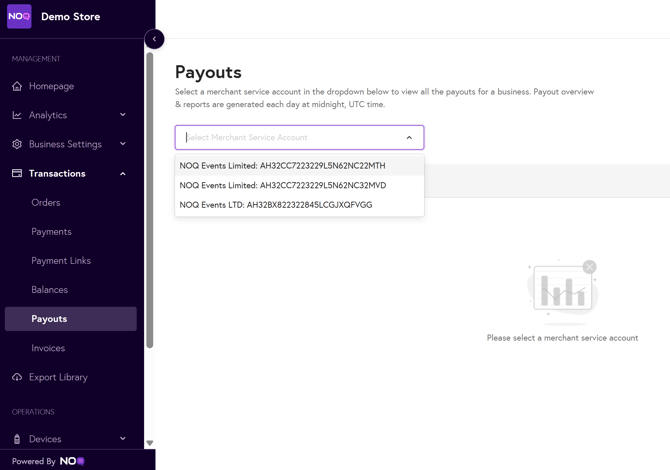
2. After selecting the desired bank account, you can also choose the relevant balance account to review all transfers made in the past 30 days. These payouts represent your total sales, minus card processing fees and any additional transfers initiated by business owners.
Assigning multiple balance accounts to your stores, streamlines your reconciliation. Instead of receiving a single lump-sum payout that requires you to manually separate funds by store, you receive individual payouts for each store, making it easier to track where your revenue is coming from. To set up Balance accounts follow this link.

3. To select a different date range, click on the “30 days” option and choose your preferred timeframe from the pop-up calendar.

4. To view the transactions related to each payout, navigate to the Reports tab under your selected account. Here, you’ll find a detailed list of payouts, each with the option to download a CSV file that displays every transaction included in the deposited total.
- The “Type” column helps distinguish between payments that have been captured and those that have been fully booked (Bank Transfer) - showing exactly which transactions have been credited into your account.

5. If any adjustments occur at the same time as your payout, these will appear immediately in your payout overview after you select the transfer to view more details.

It can also be viewed on the CSV download as an Internal Transfer.

The Balance and Payout reports provide a comprehensive and user-friendly overview of every transfer deposited into your account. With dedicated reports for each payout, you and your finance team can access detailed breakdowns—showing not just the total deposited, but also each individual transaction that contributed to that sum. This clarity ensures all transfers, deductions, and adjustments are transparent, making it simple to reconcile accounts, track revenue sources, and monitor your cash flow with confidence.