
As a business owner, you can log in to the Insights app using the same credentials you use for the NOQ portal. You can also assign a manager to a specific store; the manager’s email address and password can then be used to access insight reports for that store and the event site it is linked to.
1. Log in to the NOQ Portal.
2. From the sidebar, go to Business Settings ⚙️> User. Click on Manager.
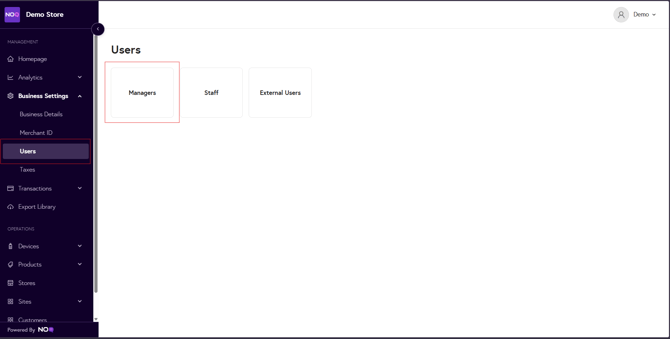
3. Click on the Pen🖊️icon to edit the manager.

Want to create new manager? Click on the link below to see the guide on it.
How to create Manager
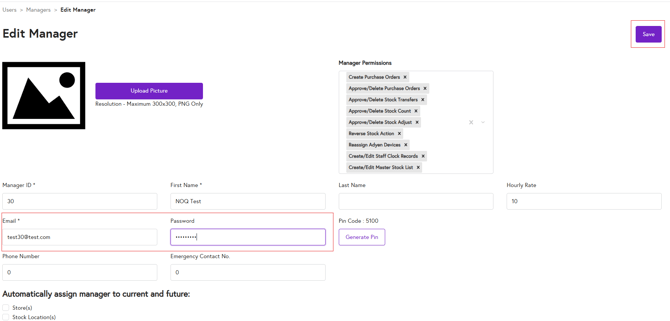
4. Enter the manager’s email address and password in the corresponding fields. Click on the Save.
5.Go back to the Managers list page and click on the Store 🏪 icon for the same manager.

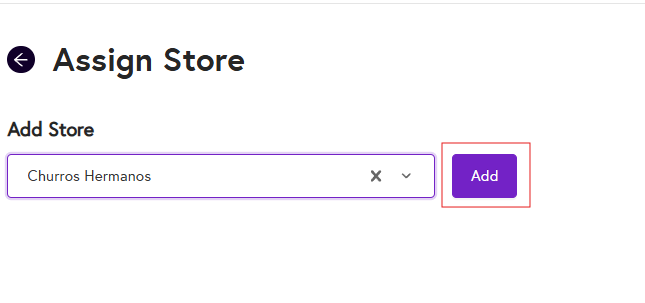
6. From the dropdown, select the store you want to assign the manager to, then click Add to confirm. You can assign a manager to multiple stores.
The manager can now log in to the NOQ Insights app using their email address and password.